Fox ESS H1 hybrid inverter
Your Fox ESS H1 is a hybrid inverter: one unit that links your solar panels, battery, home and the grid, and decides where each unit of electricity goes.
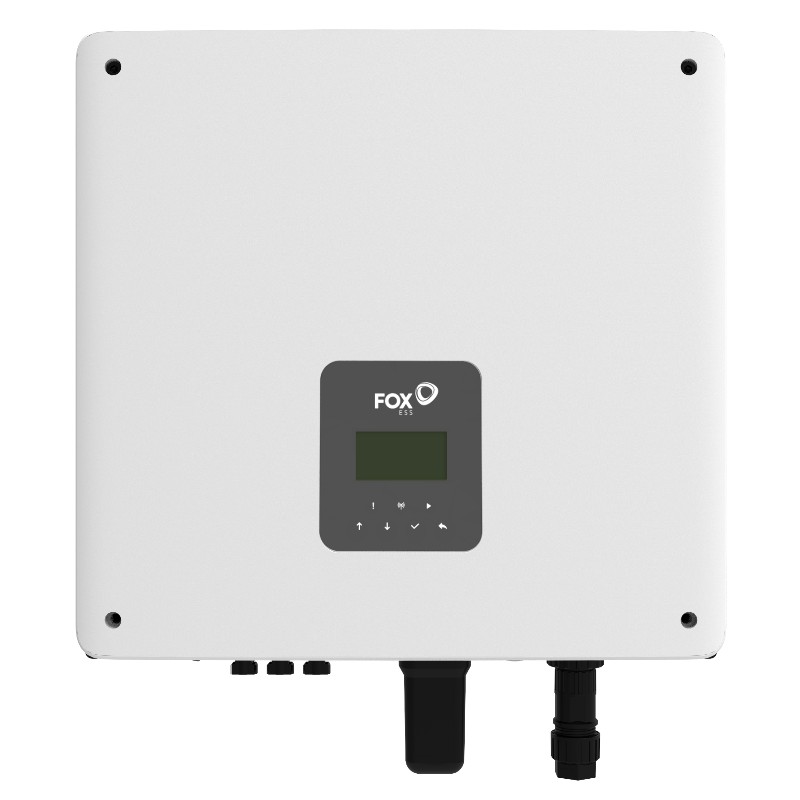
About this equipment
About your system
Your Fox ESS H1 is a hybrid inverter: one unit that links your solar panels, battery, home and the grid, and decides where each unit of electricity goes.
Day-to-day use
Out of the box the H1 runs itself in Self-use mode, which suits most homes. Other work modes are optional and are changed in the FoxCloud 2.0 app under Plant → Dashboard → Quick Settings → Work Mode.
- Self-use (default): Solar runs your home first and any surplus charges the battery. The battery covers the home when solar falls short, and leftover solar is exported. Best for: most homes.
- Feed-in Priority: Solar runs your home first, then surplus is exported to earn payments. If export is limited, the extra goes into the battery. Best for: export payments worth more than stored energy.
- Backup: Charges the battery to a reserve level you set and holds it there. It won't discharge at or below that level. Best for: keeping energy in reserve for power cuts.
- Peak Shaving: Limits how much power you draw from the grid during expensive periods. Best for: homes with costly peak-time electricity.
- Force Charge / Force Discharge: Charges the battery to a target level from solar, grid or both, or discharges it to power the home and, if allowed, export. Set in the Mode Scheduler. Best for: time-of-use tariffs.
Available modes can differ between inverter models and firmware versions, so you may not see every option in your app.
Troubleshooting & help
Monitoring and the app
The free FoxCloud 2.0 app shows what your system is doing in near real time and is where you change work modes. Your data is also available on the Fox web portal at foxesscloud.com.
- PV yield: How much electricity your panels have generated.
- Self-consumption: The share of your solar generation that was used in your home or stored, rather than exported.
- Self-sufficiency: The share of your home's electricity use met by solar and battery, rather than the grid.
- Revenue: An estimate based on the unit price (income per kWh) set for your plant in the app. It is hidden if that price is set to 0.
Your battery
Your Fox ESS high-voltage battery is built to be cycled every day, and Fox backs it with a guarantee that it keeps at least 70% of its original energy for 10 to 12 years once it is registered. Exact figures vary by battery model, so check your model's datasheet or your handover pack.
Power cuts and backup
The H1 can keep selected circuits running in a power cut, but only if your installer has set up its emergency power supply (EPS) output. Ask your installer exactly which circuits are on it.
Grid, export and tariffs
Your installer is responsible for telling your local network operator about the system, but whether you earn money from exporting depends on your electricity supplier and tariff.
Safety, maintenance and warranty
The system needs very little day-to-day attention, but register your warranty promptly and call your installer if anything looks wrong.
Lights on the inverter
- Green: normal operation.
- Blue: the battery is connected normally.
- Red: a fault, including an insulation fault.
If there is a fault
- Note the light colour and any fault code in the app, and take a screenshot.
- Don't open the unit or attempt repairs. Dangerous voltage can remain inside after it is switched off, and only qualified electricians should work on it.
- Contact your installer. Warranty claims are made through them.
If you ever see smoke, flames or smell burning, leave the building and call 999. Don't try to isolate the system yourself. Ask your installer to show you where the isolators are and how to shut the system down in your handover.
Warranty
- H1 inverter: 5 years standard, up to 10 years with registration.
- Battery: ECS or EQ series: 5 years standard, up to 12 years with registration.
- Battery: EP series, Mira HV25, HV2600: 5 years standard, up to 10 years with registration.
The longer cover only applies if the product is registered on the Fox ESS website and connected to Fox Cloud through a Fox datalogger for remote monitoring. Fox recommends registering within six weeks of commissioning. Ask your installer to confirm in writing that both your inverter and battery are registered.
These are the terms in Fox's UK and Ireland policies at the time of writing. Check the certificate you were given, because your battery model and the date of purchase decide which terms apply.
Sources
Checked on 21 November 2026. Figures vary by model and policy version, so your handover pack and warranty certificate take priority.
- Fox ESS UK & Ireland battery warranty policy, v4.2
- Fox ESS UK & Ireland inverter and charger warranty policy, v1.8
- Fox ESS H1 G2 WL user manual, v1.0.3
- Fox ESS H1 G2 WL datasheet, v1.3
- FoxCloud work mode selection guide
- FoxCloud 2.0 quick guide
- FoxCloud 2.0 on the App Store
- Fox ESS ECS4100 battery datasheet
- Fox ESS ECS batteries
- Welsh Government: connecting on-site generation to the grid
- GOV.UK: Smart Export Guarantee
- Which?: Smart Export Guarantee explained
Frequently Asked Questions
It turns the DC power from your solar panels into the AC power your home uses, and it also charges and discharges your battery. Because one unit handles both jobs, solar power your home isn't using can be stored instead of exported, then used later when the panels aren't producing.
In the default "Self-use" setting, your solar power goes to your home first. Any surplus charges the battery, and once the battery is full the rest is exported to the grid. When the panels aren't producing enough, the battery covers your home. If the battery is empty too, you draw from the grid as normal.
Yes. The H1 is a grid-connected system, and the grid tops up your home whenever solar and battery can't meet demand. It isn't designed to take your home fully off-grid.
The number in the model name is the rated output in kilowatts, so an H1-5.0-E-G2 is a 5kW inverter. "G2" means second generation. The current H1 G2 range runs from 2.5kW to 6kW.
A small clamp called a CT (current transformer) is fitted on your incoming mains supply, usually near the meter or consumer unit. It lets the inverter see what your home is drawing from, or sending to, the grid. If it is moved or disconnected, for example during electrical work, tell your installer, because the system will misread your usage.
| Mode | What it does | Best for |
|---|---|---|
| Self-use (default) | Solar runs your home first and any surplus charges the battery. The battery covers the home when solar falls short, and leftover solar is exported. | Most homes |
| Feed-in Priority | Solar runs your home first, then surplus is exported to earn payments. If export is limited, the extra goes into the battery. | Export payments worth more than stored energy |
| Backup | Charges the battery to a reserve level you set and holds it there. It won't discharge at or below that level. | Keeping energy in reserve for power cuts |
| Peak Shaving | Limits how much power you draw from the grid during expensive periods. | Homes with costly peak-time electricity |
| Force Charge / Force Discharge | Charges the battery to a target level from solar, grid or both, or discharges it to power the home and, if allowed, export. Set in the Mode Scheduler. | Time-of-use tariffs |
Available modes can differ between inverter models and firmware versions, so you may not see every option in your app.
Yes. In the Mode Scheduler, add a time window, choose Force Charge and set the battery level you want to reach. Outside your windows the system returns to its normal mode, Self-use by default. The scheduler also keeps a small reserve (about 10%) in the battery for stable operation.
There are three common reasons:
- Your home is asking for more power than the system can deliver at once. The inverter has a rated output (2.5kW to 6kW depending on model), and the grid automatically covers the rest.
- A mode or schedule is holding the battery, such as Backup, Force Charge or Peak Shaving.
- The battery has reached its minimum reserve level.
If none of these explains it, contact your installer.
A schedule told it to. Check the Mode Scheduler in the app. If you don't want grid charging, ask your installer to help you remove or change the schedule.
Solar still produces on cloudy days, but far less. In winter you may rarely fill the battery from solar alone. If you are on a time-of-use tariff, a short overnight Force Charge window can top it up cheaply.
Open the app and select your plant. The dashboard shows power flowing between your panels, battery, home and the grid, updated in near real time. You can also view trends by day, week, month and year.
| Figure | What it tells you |
|---|---|
| PV yield | How much electricity your panels have generated |
| Self-consumption | The share of your solar generation that was used in your home or stored, rather than exported |
| Self-sufficiency | The share of your home's electricity use met by solar and battery, rather than the grid |
| Revenue | An estimate based on the unit price (income per kWh) set for your plant in the app. It is hidden if that price is set to 0 |
The app works from the inverter's and CT's readings, so it is an estimate. Your supplier bills from your meter, and that is the figure that counts.
Your system keeps generating and storing energy while offline, but changes you make in the app won't reach it, and cloud-based features may pause. The usual cause is a changed Wi-Fi password, a replaced router or a weak signal.
- Check your router is working and other devices can connect.
- Restart the router and wait a few minutes.
- If it stays offline, ask your installer to reconnect the inverter's monitoring module to your network.
It matters to fix this promptly. Fox's extended warranty depends on your system being registered on Fox Cloud and connected for remote monitoring.
Work Mode and Mode Scheduler are designed for you to use. Leave installer-level settings alone, such as grid code, export limit, CT, battery and emergency power settings. Changing them can put your system out of line with what your network operator approved, and can affect your warranty.
Less than the headline capacity. Batteries are sold by nominal capacity, but a small reserve is kept back to protect the cells. Fox's ECS series, for example, is rated at 90% depth of discharge, so two 4.03kWh ECS4100 modules (8.06kWh) give about 7.3kWh of usable energy. The app shows the battery's state of charge (SOC), which is simply how full it is as a percentage.
Fox's ECS series is rated for at least 6,000 charge cycles under Fox's test conditions. One cycle is one full charge and discharge, so a battery cycled once a day would take roughly 16 years to reach that figure. Like all batteries it loses capacity slowly over time, which is why the warranty guarantees 70% of original energy rather than 100%.
The warranty also has an energy throughput limit for each model. If your battery is small and cycles hard every day, it will reach that limit sooner.
Yes. Lithium batteries charge more slowly when cold. Fox lists its ECS batteries as charging between 0°C and 55°C, so a battery in an unheated garage may charge slowly, or not at all, on freezing winter mornings. Discharging is allowed down to −10°C.
In warm weather, keep the battery well ventilated. Fox's UK warranty requires at least 300mm of clearance around the battery, so don't stack boxes or storage against it.
Often yes. Fox's high-voltage batteries are modular, and the ECS series, for example, allows up to seven modules in series. The limit depends on your inverter and battery model, so ask your installer before buying anything. Extra capacity should be fitted by a qualified installer and registered with Fox so the warranty covers it.
Only the circuits wired to the EPS output, and only if EPS has been switched on, because it is off by default. In practice this is usually a small set of essential circuits, not the whole house. If EPS isn't set up, your solar and battery won't power your home during a cut, because the inverter disconnects from the grid for safety.
Fox quotes a switchover time of under 10 milliseconds in its datasheet and under 20 milliseconds in its manual. Most equipment will carry on without noticing, but sensitive devices can still restart. If anyone in your household relies on powered medical equipment, don't depend on this alone. Talk to your installer about a dedicated solution.
Anything within your inverter's EPS rating. Continuous output is between 2.5kVA and 6kVA depending on model, with a higher peak for up to 60 seconds. Lights, sockets, a fridge, broadband and similar loads are usually fine.
High-power appliances such as electric showers, ovens and immersion heaters can exceed the rating, which is why they are normally left off the backup circuit. Fox also advises avoiding motor loads such as pumps and compressors on the EPS output. If the inverter shows an "Eps Over Load" alarm, switch off big appliances.
Divide the usable energy in your battery by the power you are drawing. For example, 7kWh of usable energy and an average draw of 0.5kW (fridge, lights, router and TV) lasts about 14 hours. If the sun is out, your panels can supply the backup circuits and recharge the battery during the day. If the battery runs low, backup power can stop until solar recharges it or the grid returns.
Yes. Switch to Backup mode in the app and set the reserve level you want. The system charges the battery to that level, from solar first and then the grid if needed, and won't discharge at or below it. Remember to switch back to Self-use afterwards, because Backup mode stops the battery helping with your daily bills.
Yes. Your installer should notify your distribution network operator (DNO). On a single-phase supply, systems up to 3.68kW follow the "G98" connect-and-notify route, where the installer reports it within 28 days of commissioning. Anything larger follows "G99", which needs the DNO's approval before the system is connected. Ask your installer for a copy of the confirmation and keep it with your paperwork.
3.68kW (16A) is the single-phase limit between the two routes. The 3.7kW H1 G2 models are built to stay within it. Larger inverters need G99 approval, or an export limit arranged by your installer. Either way, the limits in your inverter were set to match your approval, so please don't change them yourself.
It can, if your grid approval allows it and the system is set up for it. In the Mode Scheduler, Force Discharge can power your home and, if allowed, export to the grid. A battery counts towards the 3.68kW limit only when it is set to export. Check with your installer that your approval covers battery export before you use it.
Possibly, through the Smart Export Guarantee (SEG). All suppliers with more than 150,000 electricity customers must offer an SEG tariff, and smaller suppliers can choose to. The government says a battery that can import and export may also benefit, and your supplier can advise. Some suppliers offer better export rates to homes with a battery, though tariffs differ on whether electricity stored in the battery is paid for. Rates vary a lot, so compare before you sign up. You will need a meter that records half-hourly exports, usually a smart meter, and proof that your installation is MCS-certified or equivalent, so keep your paperwork handy.
Yes, that is one of the best uses of a battery. In the Mode Scheduler, set a Force Charge window to match your cheap rate, and leave the system in Self-use at other times. Time-of-use tariffs and export payments usually need a smart meter, so check with your supplier. Some tariffs also offer automatic battery control through a supplier's app or a third-party service. Ask your supplier whether yours does and whether it works with Fox.
Your installer chose the location, so please keep it as it was. Fox's manual asks for at least 300mm of clear space around the inverter, good ventilation, and no flammable materials nearby. It also advises keeping the inverter out of direct sunlight, rain and snow, even though it is rated IP65 for outdoor use. The inverter's surface can get hot in use, so avoid touching it. Don't stack boxes or storage against either unit.
Very little day to day. Fox's manual says to check the cooling fins on the back of the inverter for dust and clean them when needed. It also calls for a check of the indicators and wiring every 6 months, and a full safety check by a qualified technician at least once every 12 months, with the results recorded. Ask your installer about a service visit. Following the manual's guidance also helps keep your warranty valid.
- Green: normal operation.
- Blue: the battery is connected normally.
- Red: a fault, including an insulation fault.
- Note the light colour and any fault code in the app, and take a screenshot.
- Don't open the unit or attempt repairs. Dangerous voltage can remain inside after it is switched off, and only qualified electricians should work on it.
- Contact your installer. Warranty claims are made through them.
If you ever see smoke, flames or smell burning, leave the building and call 999. Don't try to isolate the system yourself. Ask your installer to show you where the isolators are and how to shut the system down in your handover.
| Product | Standard warranty | With registration |
|---|---|---|
| H1 inverter | 5 years | Up to 10 years |
| Battery: ECS or EQ series | 5 years | Up to 12 years |
| Battery: EP series, Mira HV25, HV2600 | 5 years | Up to 10 years |
The longer cover only applies if the product is registered on the Fox ESS website and connected to Fox Cloud through a Fox datalogger for remote monitoring. Fox recommends registering within six weeks of commissioning. Ask your installer to confirm in writing that both your inverter and battery are registered.
These are the terms in Fox's UK and Ireland policies at the time of writing. Check the certificate you were given, because your battery model and the date of purchase decide which terms apply.
Contact your installer first. Only the installer or Fox-authorised personnel can make a claim, and the installer must be accredited. Fox then asks for the product model, fault code and evidence of the fault, and aims to approve and dispatch a replacement within three working days, subject to stock. If your installer has stopped trading, you can appoint a local installer at your own expense.
The warranty doesn't cover damage from causes such as poor ventilation, improper installation or wiring, unauthorised repairs, lightning, overvoltage, fire or flooding.
Documents & downloads
Need help with this equipment?
Having an issue with your equipment? Fill in the form with your details and a description of the problem, and our team will get back to you as soon as possible.